
Cheat Sheets
Every Data Structure on 1 Page
Array
An Array is an ordered list of elements, where each lives at an index 0, 1, 2, and so on. Arrays are also called "lists" in Python.

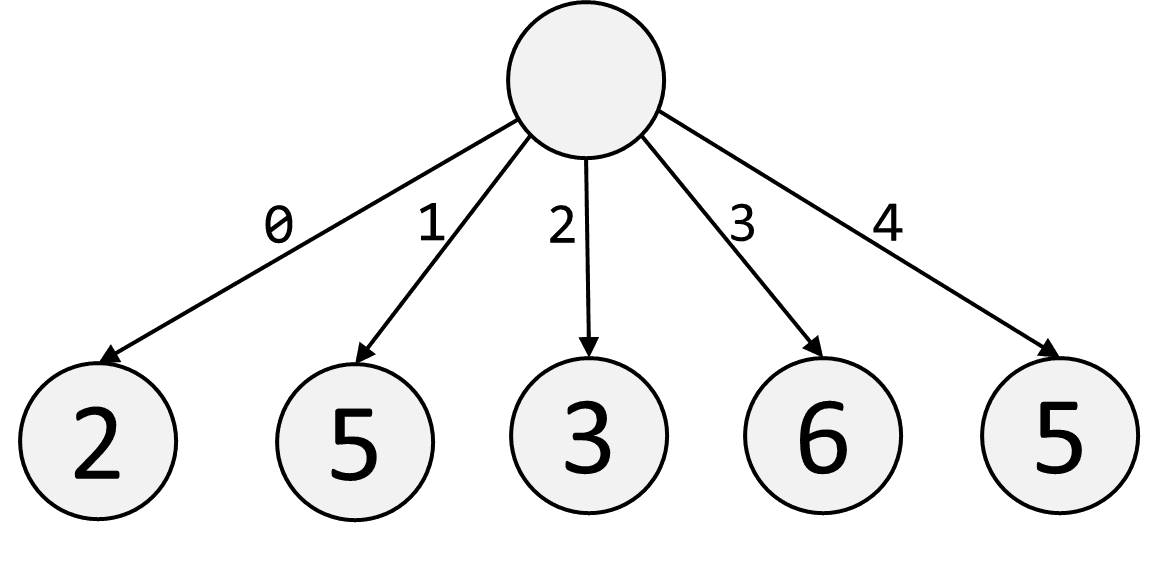
arr = [1, 3, 3, 7]

for val in arr:
    # 1,3,3,7

7 in arr # True, takes O(n)

arr[3]           # read O(1)
arr[3] = 8       # write O(1)

arr.insert(1, 9) # insert O(n)
del arr[1]       # delete O(n)
arr.append(9)    # insert last element O(1)
arr.pop()        # delete last element O(1)
Read/Write Time O(1).
Insert/Delete Time O(n).
Stack
A Stack is an Array, but where you only Insert/Delete the last element. This makes inserting and deleting fast.

stack = [1, 3, 3, 7]

val = stack.pop() # remove last element, O(1)

stack.append(8)   # add last element, O(1)
Read/Write Time O(1).
Append/Pop Time O(1).
HashMap
A HashMap is a generalized type of Array, where you can look up data using "keys". Keys can be anything as long as they're immutable: strings, tuples, numbers, letters, etc.
HashMaps are called "dictionaries" or "dicts" in Python. We talk about how to implement a HashMap from scratch here.

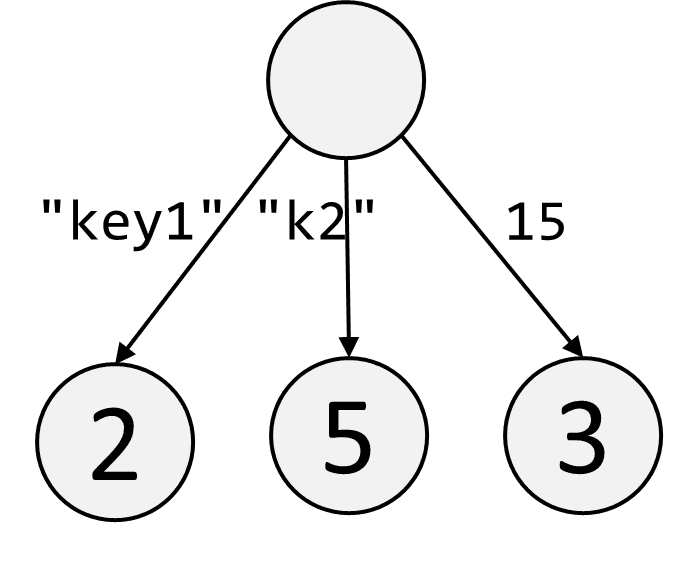
h = {} # empty hashmap
h = { # hashmap of the above image
    "a": 1,
    "b": 3,
    "c": 3,
    "d": 7
}

# look for a key, and if it doesn't exist, default to 0
h.get("a", 0) # 1
h.get("e", 0) # 0

for key in h:
    print(key) # "a" "b" "c" "d"

for k,v in h.items():
    print(k) # "a" "b" "c" "d"
    print(v) # 1 3 3 7

h["b"]         # read
h["b"] = 8     # write
h["z"] = 9     # insert
del h["b"]     # delete

"a" in h # True, O(1)
Read/Write Time O(1).
Insert/Delete Time O(1).
Set
A Set is effectively a HashMap where all the values are True. The point is to quickly check if an element is/is/isn't in a Set. Sets have slightly different methods from HashMaps even though they are essentially represented the same way.

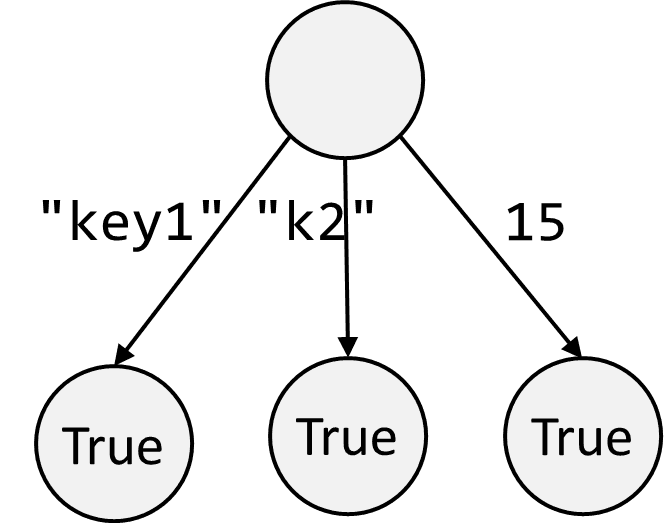
s = set() # empty set
s = {"a", "b", "c", "d"} # create set

s.add("z")     # add element
s.remove("c")  # remove element
val = s.pop()  # remove and return element

for val in s:
    print(val) # "a" "b" "d" "z"

"z" in s # True, O(1)


x = {"a", "b", "c"}
y = {"c", "d", "e"}
z = x | y # {"a", "b", "c", "d", "e"}
Read/Write Time O(1).
Insert/Delete Time O(1).
Linked List
A Linked List is a custom data structure that you implement yourself. The first node in the Linked List is called the "head". Each node has a value val, and points to the next node next.

# create a linked list
a = { "val": 1 } # head
b = { "val": 3 }
c = { "val": 3 }
d = { "val": 7 }
a["next"] = b # point nodes properly
b["next"] = c
c["next"] = d
We used HashMaps here instead of ListNodes, but both are perfectly valid and interchangeable (see Classes and Objects).
Read/Write Time O(n).
Insert/Delete Time O(n).
Tree
A Tree is a custom data structure you implement yourself.
Typically when you say "Tree", you're really referring to the root node of a Binary Tree. In a Binary Tree, each node has a value val, a left child left, and a right child right.

Here's how you create the above binary tree:
# create the above tree
root = { "val": 1 } # create nodes
l    = { "val": 2 }
r    = { "val": 3 }
ll   = { "val": 4 }
lr   = { "val": 5 }
rl   = { "val": 6 }
rr   = { "val": 7 }
root["left"]  = l # point nodes properly
root["right"] = r
l["left"]     = ll
l["right"]    = lr
r["left"]     = rl
r["right"]    = rr

# can create the same exact tree using nicer syntax
root = { "val": 1,
    "left":  { "val": 2, "left": { "val": 4 }, "right": { "val": 5 }},
    "right": { "val": 3, "left": { "val": 6 }, "right": { "val": 7 }},
}
We used HashMaps here instead of TreeNodes, but both are perfectly valid and interchangeable (see Classes and Objects).
Trees generally have a height of O(n), but balanced trees are spread wider and have a height of O(log n), which makes reading/writing faster.
Read/Write Time Varies.
Insert/Delete Time Varies; O(log n) for balanced trees like Binary Search Trees and Heaps.
Graph
A graph is made of nodes that point to each other.

There are two general ways you can store a graph, and both are common in coding interviews:
# Option 1: Store the graph using nodes
Paris = {} # create nodes
NY    = {}
Tokyo = {}
Madrid= {}
Delhi = {}
Oslo  = {}
Paris["neighbors"] = [NY, Oslo] # point nodes properly
NY["neighbors"]    = [Tokyo]
Tokyo["neighbors"] = [Madrid, Oslo]
Madrid["neighbors"]= [Delhi]
Delhi["neighbors"] = [Oslo]
Oslo["neighbors"]  = [NY, Tokyo]

# Option 2: "Adjacency Matrix" that stores all the connections
adjacenyMatrix = {
    'Paris': ['NY', 'Oslo'],
    'NY':    ['Tokyo'],
    'Tokyo': ['Madrid', 'Oslo'],
    'Madrid':['Delhi'],
    'Delhi': ['Oslo'],
    'Oslo':  ['NY', 'Tokyo'],
}
You might also see a graph just stored as a single array of edges like [['Paris', 'NY'], ['Paris', 'Oslo'], ['NY', 'Tokyo'], ['Tokyo', 'Madrid'], etc], but that format is inefficient to read from and traverse. If you're reading frequently or walking
along the graph, then you should use (or convert to) one of the two above formats.
We used HashMaps here instead of GraphNodes, but both are perfectly valid and interchangeable (see Classes and Objects).
Read/Write Time Varies.
Insert/Delete Time Varies.
Deque
A Double-Ended Queue (Deque) is a Linked List that has a next pointer next and a previous pointer prev. It's a built-in data structure, and the syntax is similar to an Array.

The main benefit of Deques is that reading and writing to the ends of a Deque takes O(1) time; however, the tradeoff is that reading and writing in general takes O(n) time. This is useful when you want to quickly read from both ends of a data structure (like in a Queue) instead of just one end (like an Array).
from collections import deque
dq = deque([2, 5, 3, 6, 5])

# These are O(1)
dq.pop()           # remove last element
dq.popleft()       # remove first element
dq.append("a")     # add last element
dq.appendleft("b") # add first element

#These are O(n)
dq[3]
dq[3] = 'c'

for val in dq:
    print(val) # 2 5 3 6 5

5 in dq # True, takes O(n)
Read/Write Time O(n).
Insert/Delete Time O(n).
Append/Pop Time O(1).
AppendLeft/PopLeft Time O(1).
Queue
A Queue is not a new data structure - it's the name for an ordered data structure where you add elements from one side, and remove elements from the opposite side. Typically you add elements on the right side, and remove them from the left side.

You should implement a Queue using the Deque data structure, so that it's fast to add/remove from both sides of it. You should not use an Array because it's slow to add an element to the left side of it. Here's how you implement a Queue:
from collections import deque
q = deque([1, 3, 3, 7])

val = q.popleft() # remove 0th element from one side
print(val)        # 1
print(q)          # [3, 3, 7]

q.append(5)       # add as last element to the other side
print(q)          # [3, 3, 7, 5]
Read/Write Time O(1).
Append/Pop Time O(1).
Sorted Array
A Sorted Array is just an Array whose values are in increasing order. Sorted Arrays are useful because you can use Binary Search on them, which takes O(log n) time to search for an element.

Sorting an array takes O(n log n) time, except for special cases like when you have only integers and can use Counting Sort. We talk about the different sorting algorithms here.
Here are some built-in Python methods for sorting an Array, which take O(n log n) time:
# create a new sorted array:
array = sorted([4,7,2,1,3,6,5]) # [1,2,3,4,5,6,7]

# sort the array in-place
array2 = [4,7,2,1,3,6,5]
array2.sort() # [1,2,3,4,5,6,7]
To search a sorted Array, Python's bisect library contains Binary Search methods you can use. However, you should probably just get good at consistently writing a Binary Search instead of using bisect.
Search Time O(log n).
Insert/Delete Time O(n).
Sort Time O(n log n).
Binary Search Tree
A Binary Search Tree (BST) is just a Sorted Array but in tree form. This makes the insert/delete time faster than if you used a Sorted Array.

Stepping left in a BST gives you smaller values, and stepping right gives you larger values. A useful consequence of this that you might want to know, is that an inorder traversal visits values in a BST in increasing order.
Search Time O(log n).
Insert/Delete Time O(log n).
Create Time O(n log n).
Heap
A Heap is a balanced tree where the values increase as you step downwards. We introduced Heaps here.

The purpose of a Heap is to have immediate access to the smallest element, which is always at the top of the Heap. When you store Heaps, you usually store them as Arrays for convenience (there are no downsides to this - see here). Heaps are typically stored in the order of their BFS traversal.
import heapq
h = [5,4,3,2,1]
heapq.heapify(h)     # creates valid heap, h=[1,2,3,5,4]
h[0]                 # find min

heapq.heappop(h)     # pop heap, h=[2,4,3,5]
heapq.heappush(h, 3) # add to heap, h=[2,3,3,5,4]
h[0]                 # find min
Python only allows Min-Heaps (smallest values on top). If you want a Max-Heap, you can implement it with a Min-Heap by multiplying all your values by -1 when you push and pop.
Read Time O(1).
Push/Pop Time O(log n).
Create Time O(n).
String
Looking for built-in Data Structures like Strings? See the other Cheat Sheet, Everything You Need to Know About Python.